Introducing Differentiation Tags in Canvas
February 4, 2026
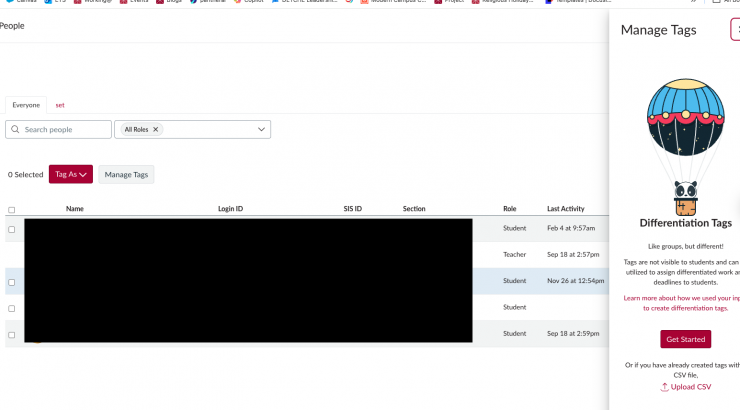
Starting in Spring 2026, Canvas courses will have a new feature designed to support inclusive, flexible, and learner-centered teaching: Differentiation Tags.
If you’ve ever wanted to assign different versions of an activity, provide targeted practice, or support varied learning pathways without managing multiple course sections or duplicating content, Differentiation Tags are for you.
What Are Differentiation Tags?
- Provide targeted support and enrichment based on readiness or prior knowledge.
- Assign different due dates, instructions, or resources.
- Scaffold learning as students move from novice to expert.
- Design flexible pathways within a single Canvas course. Offer choice in assignment formats or learning modalities.
Groups vs. Differentiation Tags: What’s the Difference?
Canvas already has several ways to organize students, and it’s natural to wonder how Differentiation Tags fit in. Here’s a practical breakdown.
Groups: Collaboration Spaces
Groups are designed for student collaboration. When you create Groups, Canvas generates shared spaces with:
- Group discussions
- Group files
- Group assignments and submissions
Best for:
- Group projects/peer collaboration
- Shared digital workspaces
Differentiation Tags: Instructional Flexibility
Differentiation tags allow instructors to create custom sets of students within a course.
Best for:
- Differentiated assignments, flexible pacing, and due dates
- Targeted practice, review, or assessment prep
- Flexible learning pathways (learning goals, readiness, or format choice)
Key advantages:
- Students can have multiple tags
- Tags can change over time
- Tags remain hidden from students
Getting Started for Spring 2026
You don’t need to redesign your entire course to begin; start with one activity or one week.
👉 How do I create and manage Differentiation Tags as an instructor?
Start small:
- One assignment
- One week
- One targeted support strategy
Examples:
- Revision Pathways
Tag students for resubmission opportunities. - Flexible Pacing
Adjust due dates or content release for students who need more time. - Assignment Format Choice
Share format‑specific instructions (paper, podcast, audio, video, presentation) based on student choice. - Assessment Prep
Provide study guides or practice quizzes to targeted students before exams. - Catch‑Up Support
Create a pathway for students who miss class or fall behind. - Accessibility & Language Support
Offer glossaries, visuals, or simplified instructions discreetly.
Questions? Need Support?
- Email us at canvas@chapman.edu.
- Visit us in the Virtual Tech Hub M-F, 2:30-4:30 pm for drop-in support.
- Schedule a 1:1 consultation with a team member.