Exciting New Microsoft Teams Features for the Chapman Community
June 26, 2025
Microsoft Teams is a collaboration platform developed by Microsoft and designed to facilitate communication and teamwork in both professional and educational settings. This product is available to all Chapman faculty, students, and staff as a part of the Microsoft 365 suite of applications.
Check out the new updates in Microsoft Teams! They’re designed to make working together easier and more enjoyable. From customizable notification locations that help you stay focused, to the ability to schedule channel messages for perfect timing, these updates are all about giving you more control and flexibility.
Here’s a breakdown of what’s new:
Chat and Collaboration
- Scheduled Message Delivery in Channels: You can now set a future date and time for channel messages. Click on the plus icon, select schedule message, and choose the desired publishing time from the date picker. This feature lets you coordinate with team members across time zones or schedule messages confidently after meetings, providing flexibility and control over your messages.

Useful Tips
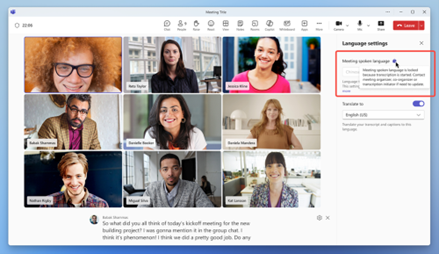
- Updating Spoken Language Settings: Now, the meeting organizer and transcript initiators can change the spoken language when transcription is enabled. This ensures accurate transcription by matching the spoken language setting to the discussion. If transcription is not enabled, all participants can change the meeting language.
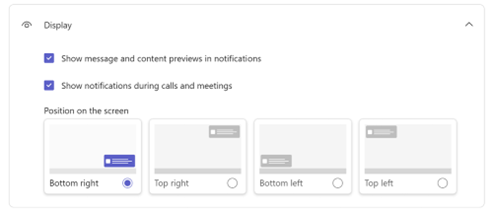
- Customize Notification Location on Screen: You can now adjust where Teams notifications appear. Choose from bottom right, top right, bottom left, or top left by going to settings > Notifications and activity > Display.
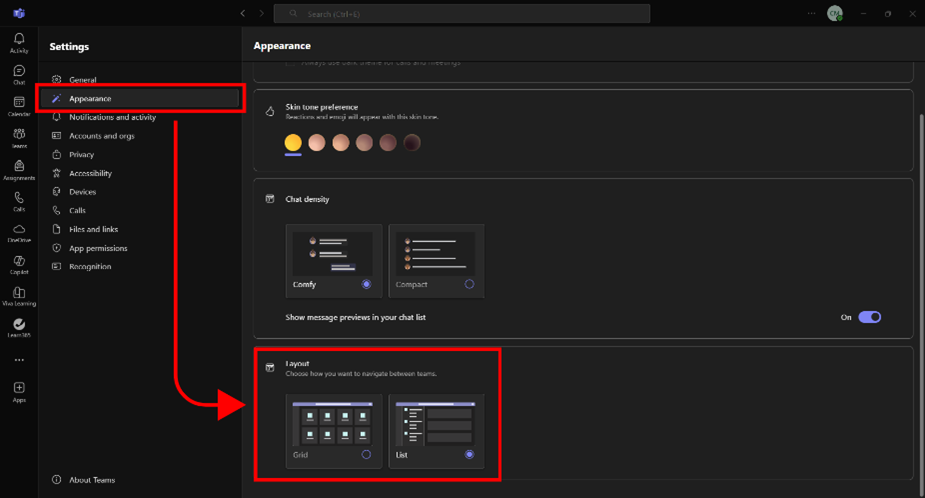
- Switching Between Grid View and List View: Here’s how to switch between a grid view and list view of your teams in the new Microsoft Teams. It is a toggle between a grid and list view; the grid is the default setting. To change your view, go to Settings and select the Appearance option from the left-hand navigation. Scroll down to Layout and select Grid or List.
These new features are designed to make your collaboration and communication smoother and more enjoyable. Try them out today and see how they can change the way you work.
If you have questions or concerns or need assistance with Microsoft Teams, please contact the Service Desk.