Canvas has launched a redesigned Files experience across both course and user Files, aimed at making file management simpler and more accessible for everyone.
Prefer the Old Files Page? You Can Still Use It (for Now)
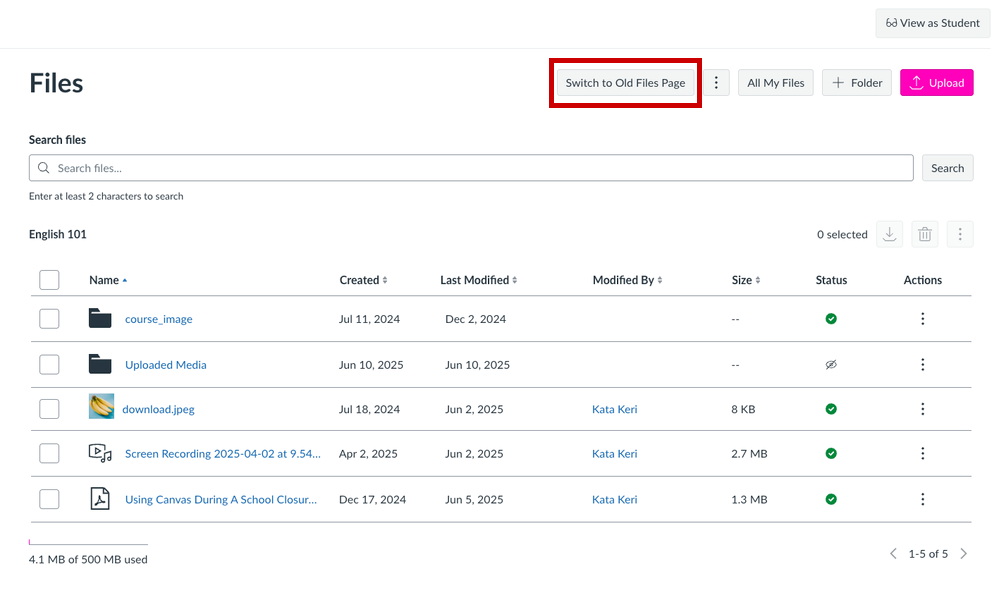
If you’re more comfortable with the classic layout, you can switch back using the Switch to Old Files Page button. This option will remain available until the end of 2025, and your choice will stick across sessions.
What Has Changed?
Here are the most important changes you’ll notice about the redesigned experience:
- Cleaner Navigation: A new landing page replaces the old folder tree, making it easier to browse and manage files.
- Bulk Actions: Select multiple files at once to download, delete, move, or edit them.
- Smarter Search & Sorting: Quickly find what you need with improved search and sortable columns.
- Accessibility Enhancements: The new design meets modern accessibility standards for a more inclusive experience.
- Safer Sharing: File preview links now work only within Canvas, helping protect your content.
- Removed Features: The folder tree view and View button are gone. Permissions and usage rights are no longer managed in the same window—Canvas is working on improvements based on user feedback that this change is causing more clicks.
If you have questions or need help navigating the new layout, please don’t hesitate to contact Educational Technology Services.
- Email us at canvas@chapman.edu.
- Visit us in the Virtual Tech Hub for drop-in support.
- Schedule a 1:1 consultation with a team member.