Windows 11 Is on Its Way
July 7, 2025
We will be transitioning to a mandatory update of Windows 11 on Tuesday, 8/5/25. The update will download automatically during the hours of 10 pm-6 am, and after it has been downloaded, you will need to restart your computer after five calendar days (if deferred for that long).
Users can proactively check for Windows updates and reboot their device when prompted, following the Windows 11 download.
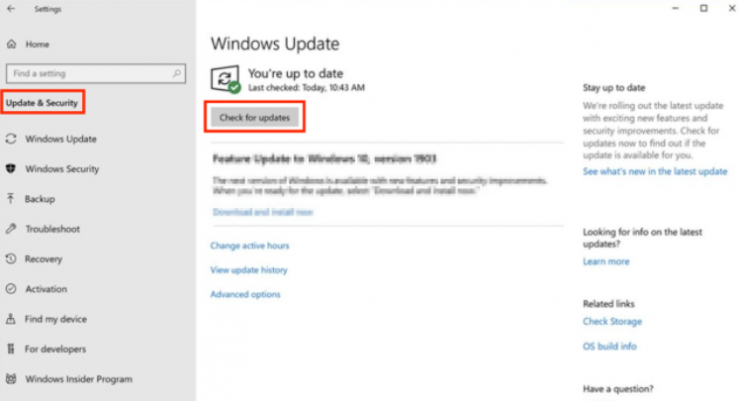
To check if Windows 11 is ready for a device, follow these steps:
- Right-click the Start menu and select Settings > Update & Security > Windows Update.
- In the Windows Update window that opens, select the Check for updates button.
With Windows 11, you will notice a cleaner, more intuitive interface, including a centered Start menu and simplified navigation that keeps everything within easy reach. It also introduces new features to make multitasking more seamless and built-in Microsoft Teams integration for quicker, easier collaboration. Windows 11 brings improved performance, better battery optimization on supported devices, and enhanced security. With built-in protection, you will benefit from stronger safeguards for your data and added peace of mind.
More importantly, as Microsoft prepares to stop supporting Windows 10 in October 2025, upgrading to Windows 11 becomes crucial for maintaining security and receiving essential updates. This transition ensures our systems remain protected against vulnerabilities and receive continued security patching and support.
To help you make the move, we have compiled a simple guide with everything you need to start. When you’re ready, we kindly ask that you follow the steps provided at the link below to check your device and begin the update process: Upgrading From Windows 10 to Windows 11. This update will not affect Mac users. However, Mac users can verify operating system updates by following these steps.
Your cooperation will help ensure a smooth and secure transition for everyone. If you have any questions or need help, the IS&T Service Desk team is here to support you.